Direct answer
If your Google Business Profile is not getting calls, do not assume the answer is simply “more SEO.” First figure out where the customer journey is breaking.
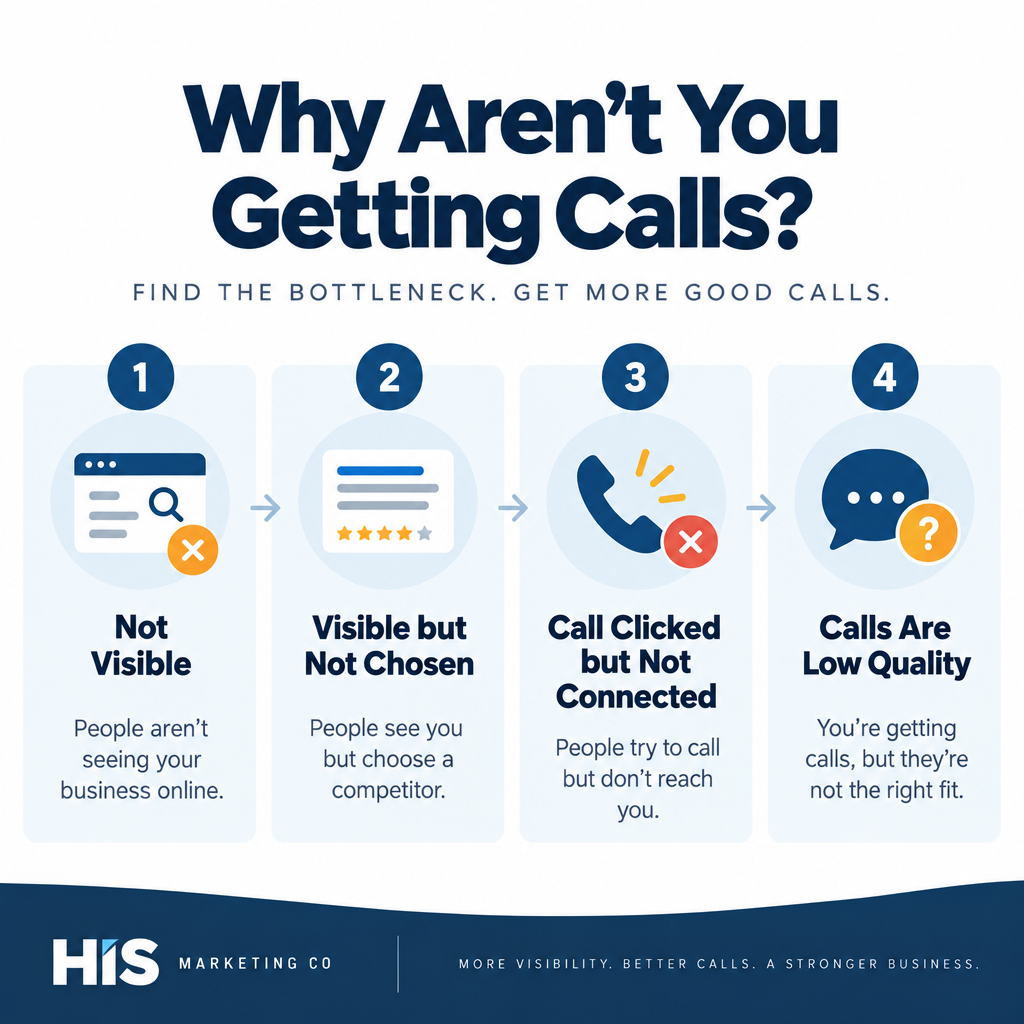
A profile can fail in three very different ways:
- People are not seeing it for relevant searches.
- People see it but do not choose your business.
- People try to contact you, but the call never turns into a useful conversation.
Those problems need different fixes.
For a Twin Cities business, I would diagnose visibility, profile conversion, phone routing, website experience, and lead quality separately before changing categories, adding more cities, or chasing ranking tactics.
This article builds on my broader Twin Cities local SEO and Google Business Profile guide. If the bigger issue is choosing which local searches your website should target, use my local keyword guide for Twin Cities businesses.
First, check what Google means by “calls”
Google Business Profile Performance can show several customer actions, including profile views, directions, website clicks, bookings, and calls.
Google defines the Calls metric as the number of times a customer clicked the call button on your Business Profile.
That is important because a call-button click does not prove that:
- the phone rang successfully
- someone answered
- the caller stayed on the line
- the inquiry was qualified
- the caller booked or purchased
So if Google shows call activity but your business says “we are not getting calls,” compare the Profile data with your actual phone records.
Look at:
- answered calls
- missed calls
- voicemail
- call duration
- caller area code where useful
- whether staff answered during business hours
- whether the call became a real lead
If Google shows zero call-button clicks, you likely have a visibility or profile-conversion problem.
If Google shows clicks but your phone records do not, you may have a routing, tracking, or phone setup problem.
If calls connect but few are useful, you may have a search-intent or lead-quality problem.
Is the profile getting enough visibility to generate calls?
Before optimizing the profile for conversion, confirm that enough relevant people are actually seeing it.
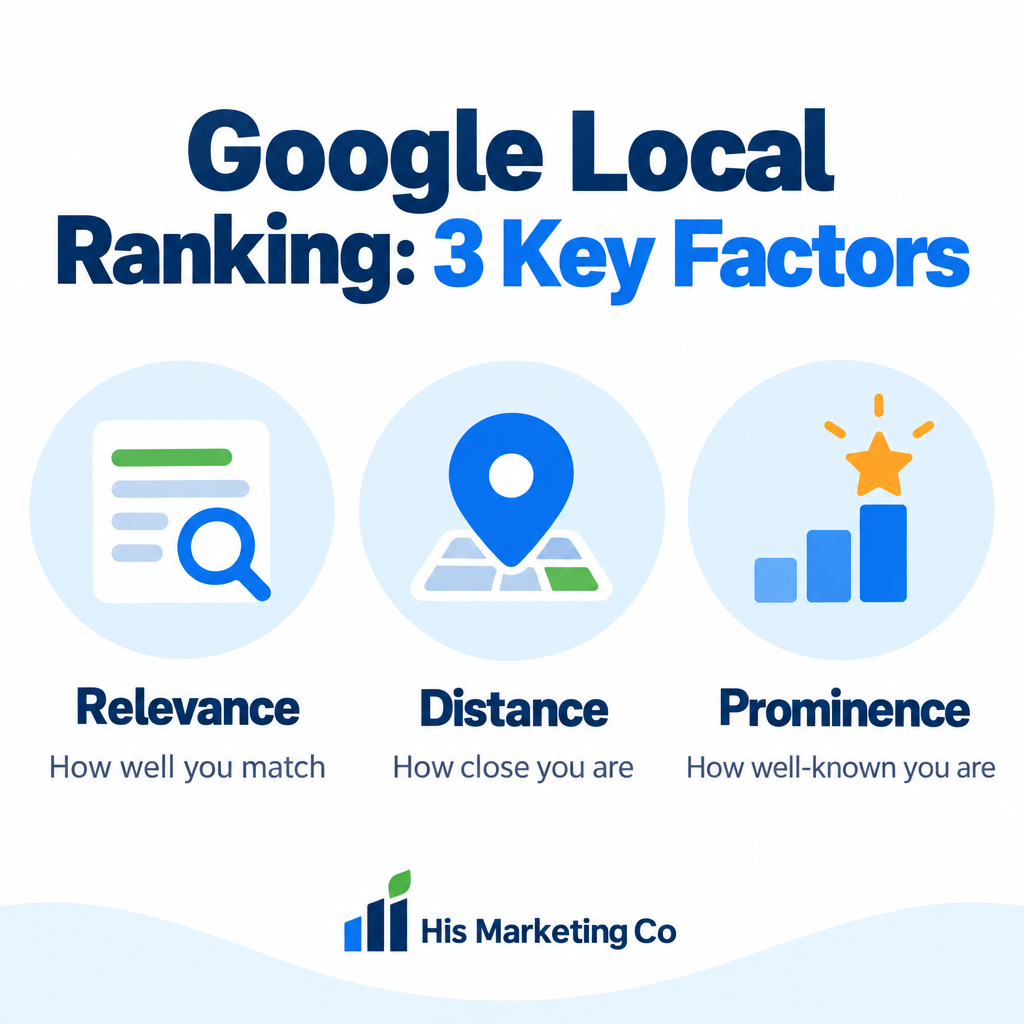
Google says local results are based primarily on relevance, distance, and prominence.
Relevance
Relevance is how well your business matches what someone is searching for.
If your primary category, services, website, and visible business information do not make the offer clear, Google may have less reason to connect the profile with the searches you care about.
For example, a Twin Cities business that mainly wants furnace-repair calls should make furnace repair easy to understand across the profile and website. That does not mean stuffing the phrase into the business name. It means accurately describing the real service.
Distance
Distance is partly outside your control.
A business in Eagan may rank differently for the same service when the searcher is in Eagan, Bloomington, Minneapolis, or Maple Grove.
That is why one search from your office is not enough to judge whether the profile “ranks.” Local results can change by location.
Adding more service areas does not guarantee that you will rank throughout those areas.
Prominence
Prominence reflects how well known the business is. Google says this can include information it finds across the web, as well as review count and review score.
The practical takeaway is that local visibility is not controlled by one profile setting.
If you are visible close to your business but disappear farther away, the issue may be normal local ranking geography rather than a broken profile.
Check whether the profile matches what customers actually search
One reason a Business Profile can get views without useful calls is that it is appearing for the wrong kinds of searches.
Start with the services that matter most to the business.
Then ask:
- What would someone search when they actually need this service?
- Does the primary category accurately represent the main business?
- Are relevant services listed accurately?
- Does the website have a strong page explaining that service?
- Is the business genuinely located in or serving the market being targeted?
Do not turn this into keyword stuffing.
The goal is alignment between the real business and customer intent.
For a deeper process, my Twin Cities local keyword guide explains how I combine the core service, modifiers, location intent, and the right page type.
Make sure the contact information is correct
This sounds basic, but it should be checked before doing anything advanced.
Google lets verified businesses maintain phone numbers, business hours, websites, locations, service areas, and other profile details.
Check the profile from a customer's perspective:
- Is the phone number correct?
- Does it ring the right phone or call-routing system?
- Are business hours accurate?
- Does the website link go to the correct page?
- Is the business marked temporarily closed by mistake?
- Is the address or service area represented correctly?
- Can a mobile user tap the number and reach the business?
Then call the number yourself from another phone.
Do not assume the number works because it looks correct in the dashboard.
Check the actual phone experience
A Business Profile can do its job and still fail to produce customers if the phone experience is weak.
I would test:
- How many rings occur before someone answers.
- What happens when nobody answers.
- Whether voicemail works.
- Whether the greeting clearly identifies the business.
- Whether missed calls receive a prompt follow-up.
- Whether staff can recognize a new lead and handle it correctly.
For a high-value service business, one missed call can be worth far more than another round of profile edits.
If calls frequently arrive outside staffed hours, consider whether the listed hours reflect when someone can actually respond.
If you use call forwarding, a CRM, tracking numbers, or an answering service, test the full route end to end.
Is the profile visible but not convincing enough to earn the call?
Visibility is only part of the job.
When several businesses appear for the same local search, the customer still has to choose one.
They may compare:
- rating and review count
- recent review quality
- photos
- business description
- service information
- hours
- proximity
- website quality
- recognizable proof
- whether the business looks active and trustworthy
Google itself encourages businesses to maintain accurate information, add photos and videos, collect and respond to reviews, and keep customer-facing information current.
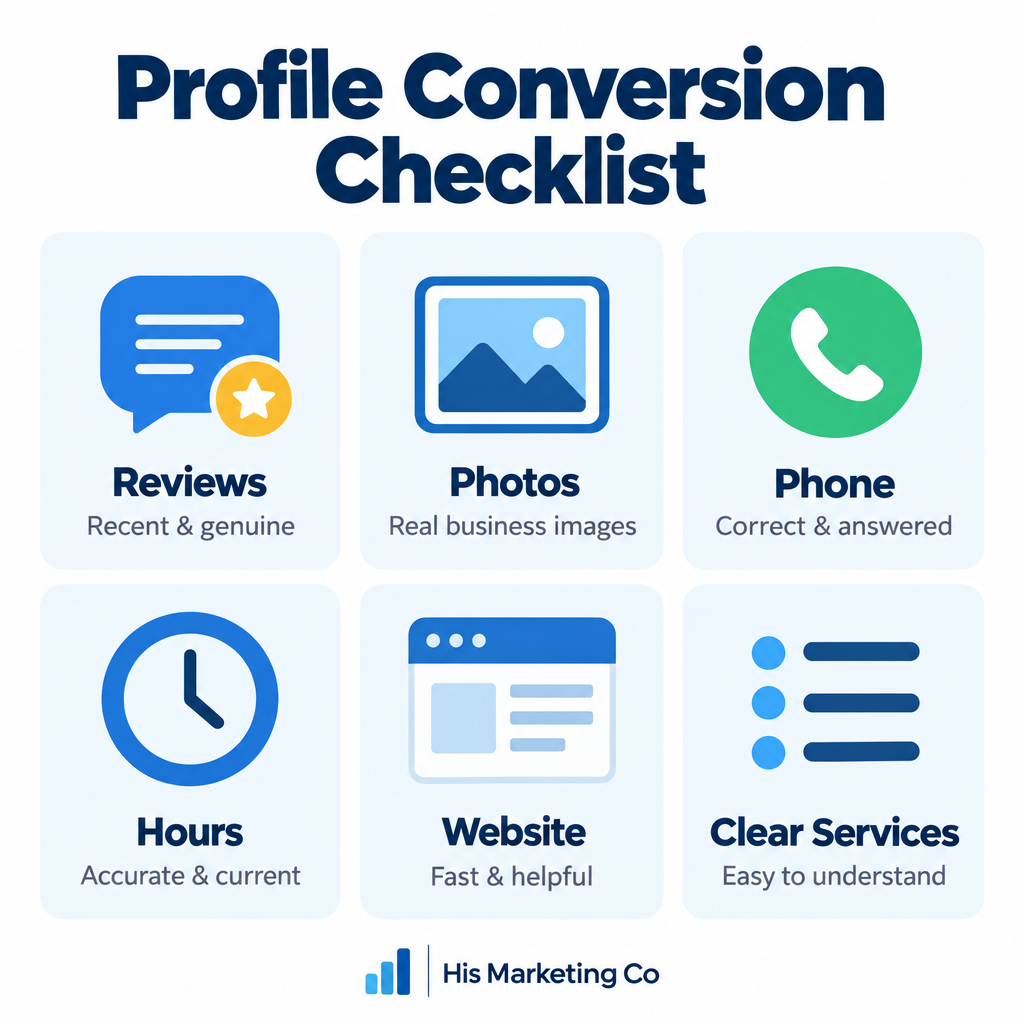
The profile should help answer a prospect's basic questions quickly:
Do you offer what I need?
Do you serve my area?
Do you look legitimate?
Can I reach you now?
Why should I choose you instead of the other options?
If those answers are unclear, higher rankings alone may not solve the call problem.
Reviews can affect both trust and local visibility
Google says review count and review score can factor into local ranking.
But reviews also matter because customers read them.
I would focus on a steady process for requesting genuine reviews from real customers.
Google provides a review link and QR code that businesses can share with customers. Google also prohibits incentives in exchange for reviews.
A simple process can include a review request after a completed service, purchase, or successful customer interaction.
Do not:
- buy reviews
- offer discounts for reviews
- ask customers to include exact keywords
- selectively route only happy customers to Google
Do:
- ask consistently
- make the process easy
- respond professionally
- protect customer privacy
- use feedback to improve the business
A business with strong visibility but weak trust signals can still lose the call to a nearby competitor.
Use real photos to reduce uncertainty
Google says category-specific photos can help customers understand the business and can help the profile stand out.
For a service business, useful images can include:
- team members
- real completed work
- technicians or staff performing the service
- vehicles
- equipment
- storefront exterior where applicable
- interior photos for customer-facing locations
- popular products
The point is not to upload photos just to satisfy an SEO checklist.
The photos should help a customer recognize the business and feel more confident contacting it.
Avoid misleading images or heavily altered visuals that do not represent the real business.
Check whether the website is losing people after the profile click
Some prospects will not call directly from the Business Profile. They will click the website first.
If Profile website clicks are healthy but calls and form submissions are weak, the website may be the bottleneck.
Check the page on a phone.
Can the visitor immediately understand:
- what the business does
- the geographic area served
- the primary call to action
- the phone number
- how to request service or an appointment
- proof that builds trust
A slow, confusing, generic homepage can waste strong local visibility.
For service businesses, I often prefer sending traffic into a page that clearly explains the service and next step rather than making the visitor search through the entire website.
My Minneapolis service-business landing-page checklist covers the conversion side in more detail.
Are people seeing the profile for the wrong location?
Twin Cities businesses often serve multiple suburbs, but local results are highly geographic.
A business may get strong visibility near its real location and very little visibility across the metro.
That is not necessarily a profile error.
Do not try to fix this by creating fake locations, virtual offices, or keyword-stuffed city names.
Instead:
- make the real location or service area accurate
- build strong pages around the services customers actually need
- create distinct location pages only where there is meaningful unique information
- earn real reviews and local credibility
- measure where real customers are coming from
My local keyword guide explains when a city-specific page may make sense and when it becomes thin duplicate content.
Does the business have enough demand right now?
Sometimes the profile is not broken. Demand is simply low.
Calls can change because of:
- seasonality
- weather
- holidays
- changes in consumer demand
- new competitors
- business-category trends
- changes in search behavior
Compare longer periods instead of judging performance from a few days.
Google Business Profile Performance lets you set a date range so you can compare how customers discover and interact with the profile over time.
If views, searches, website clicks, and calls all fall together, the issue may be visibility or demand.
If views stay steady while calls fall, the issue may be conversion, trust, competition, or the offer.
That distinction matters.
Are calls happening but not becoming qualified leads?
A high call count does not automatically mean the profile is performing well.
Calls can include:
- existing customers
- job seekers
- vendors
- wrong-service inquiries
- people outside the service area
- price shoppers
- spam
- genuine prospects
I would track whether Profile-driven inquiries become:
- Connected calls
- New leads
- Qualified leads
- Booked appointments
- Sales
The same principle applies to paid advertising. The top-of-funnel interaction is not the business outcome.
My lead tracking and qualification guide is written around Google Ads, but the measurement principle applies here too: separate the initial action from the qualified outcome.
Should you post more often on Google Business Profile?
Google lets businesses publish updates, offers, and events on the Business Profile.
Posts can help customers see current information and offers when they find the business.
I would use posts when there is something genuinely useful to communicate, such as:
- a seasonal service
- a promotion
- an event
- new availability
- an important business update
I would not treat posting every day, every three days, or another arbitrary schedule as a guaranteed ranking tactic.
Use posts to improve the customer experience, not to manufacture activity for its own sake.
Common fixes I would not rely on
There are a few tactics I would not treat as reliable solutions to a no-call problem:
- stuffing city names into the business name
- adding dozens of service areas just to try to rank in them
- creating fake office locations
- publishing dozens of duplicate city pages
- buying reviews
- uploading irrelevant photos just for volume
- changing categories repeatedly without a business reason
- obsessing over one manual search result from one device
Those tactics can distract from the actual issue and, in some cases, violate Google's policies.
A practical troubleshooting checklist
If a Twin Cities business tells me its Google Business Profile is not getting calls, I would work through this order:
- Verify the phone number. Call it yourself and test the full route.
- Review Business Profile Performance. Check views, search activity, website clicks, directions, and call-button clicks over a meaningful date range.
- Separate visibility from conversion. Are people not finding the profile, or finding it and not contacting the business?
- Review categories and services. Make sure they accurately describe the real business.
- Check local search intent. Compare the profile and website with the services customers actually search for.
- Review geographic reality. Compare performance near the business with farther parts of the Twin Cities.
- Audit reviews. Look at review quantity, quality, recency, and owner responses.
- Audit photos. Add useful real-world photos that help customers understand the business.
- Test the website. Check mobile speed, service clarity, phone visibility, forms, and calls to action.
- Check missed calls and follow-up. Make sure real inquiries are not being lost after the click.
- Track qualified outcomes. Separate raw interactions from useful leads and sales.
That sequence usually tells you whether the real problem is visibility, trust, conversion, phone handling, or lead quality.
What I would prioritize first
If your profile has almost no visibility for relevant services, start with relevance, accurate business information, the website, reviews, and local authority.
If the profile gets views but almost no calls or website clicks, focus on trust and profile conversion.
If Google reports calls but the business is not speaking with prospects, focus on phone routing and follow-up.
If calls connect but they are poor quality, focus on search intent, service clarity, geography, and qualification.
The right fix depends on which stage is failing.
For the broader strategy, use my Twin Cities local SEO and Google Business Profile guide. If you want help improving local visibility, website SEO, and the conversion path together, see my SEO and AI search optimization services.
Book a strategy call if you want me to review where your profile and website are losing potential customers.